

Your “read later” pile has been very patient. Let’s give it a job.
We’re going to build a small reading habit around a working tool: save a link, add one sentence about why it matters, and let a few simple rules suggest a shelf. You still choose what deserves your time. The desk handles the first pass at sorting.
What you’ll use: Jabez AI’s Reading Desk, a browser, and five links to try. No account, subscription, installation, or AI key is required. This version uses keyword rules; it does not open, read, or summarize the pages you save.
Open the Reading Desk in another tab so you can follow along.
1. Start with five links
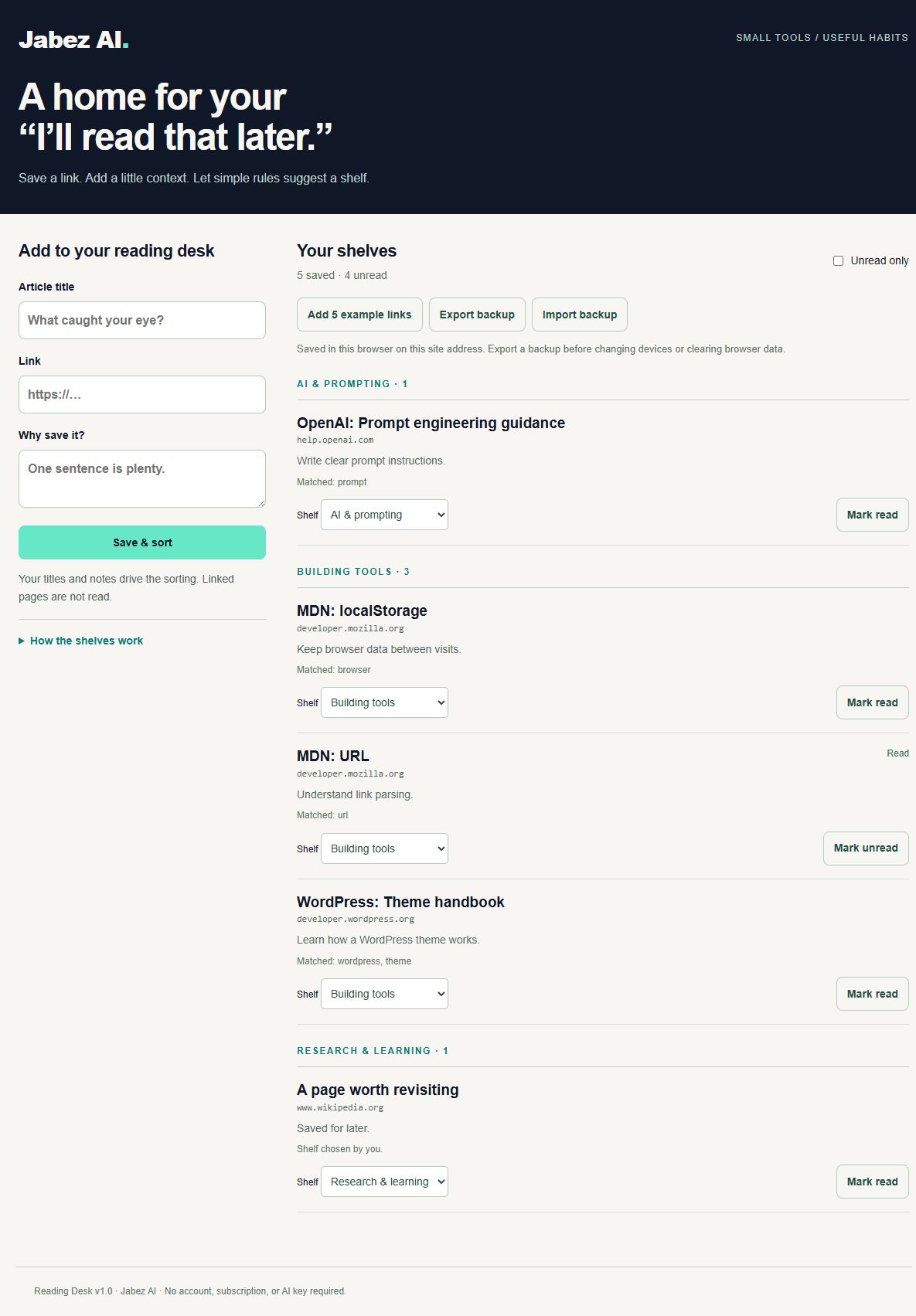
Choose Add 5 example links. The desk adds real pages from MDN, OpenAI, WordPress, and Wikipedia. These are practice bookmarks, not five sources for this tutorial.
On a fresh desk, you’ll see one link under AI & prompting, three under Building tools, and one under Needs a look. Choose the example button again and it skips the existing links instead of adding another five.
That last shelf is useful. A vague title like “A page worth revisiting,” with the note “Saved for later,” doesn’t give the rules much to work with. Rather than invent a confident answer, the desk leaves the choice to you.
2. Save something you actually want to read
Fill in Article title, Link, and Why save it?, then choose Save & sort. Copy the full address, including https://. Use your note to capture the reason you wanted the page—not just “interesting.” Future you deserves a little more context.
For example, “Study notes” with “Research and learning for my next project” goes to Research & learning. A title containing “prompt” points toward AI & prompting. The desk counts distinct matching words in the title and note; the shelf with the most matches wins.
Open How the shelves work to see the exact keywords. Ties favor AI & prompting, then Building tools, then Research & learning. The rules are English keyword matches, so synonyms and other languages may need a manual choice.
3. Give the suggestion a quick check
Each card shows the matching words, or explains that none matched. Use its Shelf menu to move it when the suggestion misses your intent.
Try moving “A page worth revisiting” to Research & learning. Its explanation changes to “Shelf chosen by you.” Your choice is saved. This is the part of workflow automation worth getting comfortable with: let the tool take a small, visible step, then make correction easy.
4. Turn saving into reading
Pick one item, open its link, and read it. When you return, choose Mark read. Select Unread only to hide finished items. Clear that filter to see everything again; Mark unread reverses a status change.
Try a small weekly routine: choose one saved item and decide what you’ll do with it. Keep a useful idea, test a technique, or accept that the page wasn’t as helpful as its headline. A beautifully sorted list still needs someone to read it.
5. Keep a backup you can move
Choose Export backup and keep the downloaded jabez-reading-desk.json file. To bring it into another browser or a new site address, open the desk there and choose Import backup, then select that file.
Imports merge with the current list. Existing links keep their title, shelf, and read status; duplicates are skipped. Importing an older backup therefore does not roll an existing item back to its earlier state. Files with invalid entries are rejected as a whole. This version supports up to 500 links and imports smaller than 2 MB.
The list lives in this browser’s storage for this site address. It does not sync through your WordPress account. Clearing browser data can remove it, private browsing is temporary, and a new domain will have separate storage. Export before making any of those changes. If storage is unavailable, the desk displays a warning to export before closing the tab. MDN explains how this browser storage works.
What this version does—and where it stops
The desk sorts the words you supply. It does not check whether a page is accurate, safe, still available, or worth reading. Address parsing helps reject unsupported link formats, but it does not verify the destination. See MDN’s URL documentation for that distinction.
For duplicate detection, the desk removes the part of an address after #. Two sections of the same page count as one bookmark. Other address differences, such as tracking parameters, can still create separate entries.
An AI summary could be a later addition, once there’s a clear reason for one. For this first version, you can see every rule and fix every suggestion. Start with five links. Read one. Then decide what would make the next visit easier.
Testing notes
Tested locally on September 10, 2026, in the Codex in-app browser. The five example links sorted into the expected starting shelves. Manual shelf and read-status changes survived a reload, the unread filter hid the finished item, and the layout fit both 1,200-pixel and 390-pixel viewports. No browser warnings or errors appeared during these checks.
Separate automated checks covered keyword ties, unmatched titles, duplicate preservation, invalid addresses, rejection of malformed imports, and a JSON backup round trip. These checks cover the sample implementation; they are not a claim of compatibility with every browser. There are no affiliate links in this tutorial.
Sources & updates
Updated September 10, 2026. Includes a working Jabez AI Reading Desk, a screenshot from local testing, and scoped testing notes. Uses keyword rules, not AI page analysis.


